
So your Gmail sidebar menu collapsed and you need to unhide it? You're not alone.
Change is hard. But Google seems to disagree...
I love that Google is always working on new features and functions for Gmail, but every now and then a new feature or design comes along that makes me scratch my head.
The latest Gmail update includes:
- helpful reminders (e.g., "Received 3 days ago. Reply?")
- a new, sleek design
- a snooze feature (you can pick a future date for mail to re-appear in your inbox)
- a collapsing sidebar
I have to say, as a work-from-home professional that uses their personal email for business, I love the snooze feature.
But... a collapsing menu? Why?
Well. I guess I understand why.
People want to maximize their screen space.
Nothing could go wrong with that one. That is unless users aren't clear on how to hide and unhide the sidebar.
That would be no fun at all. Hmm.
So your Gmail sidebar menu has collapsed, and you can't figure out how to keep the sidebar from collapsing? If your left navigation panel is collapsed and only appears if you hover over it, I have the fix.
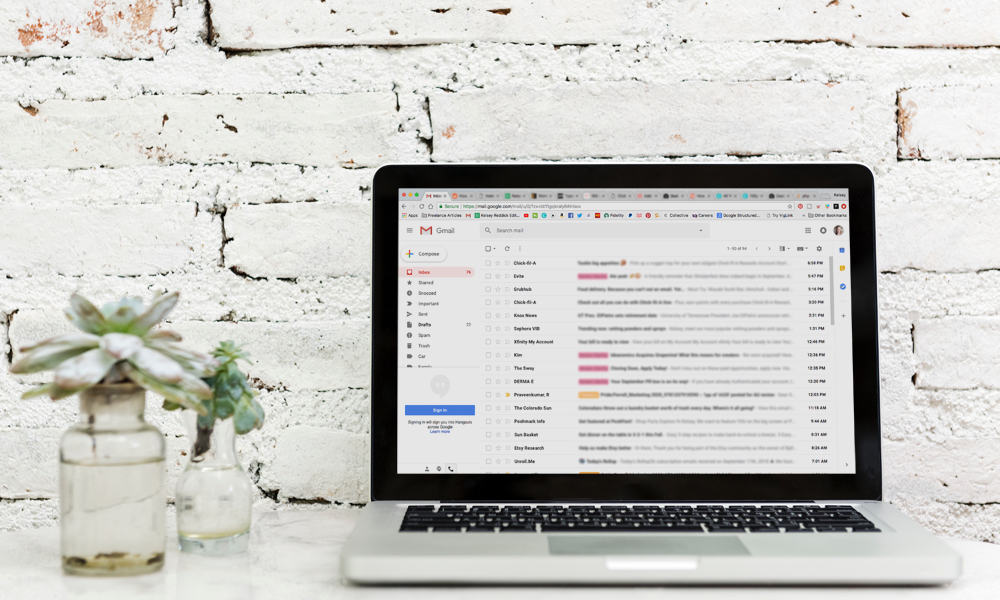
Here's how to reveal your main menu for good:
- Head to your Gmail.
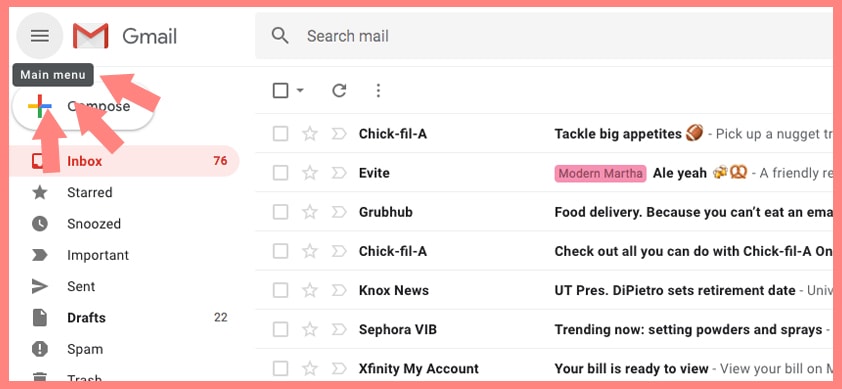
- Click the Main Menu button.
It's in the upper left corner of the screen above the Compose button. These three horizontal lines are commonly referred to as a "hamburger" menu.
When you hover, it says "Main menu." See the photo below.
This three-line button will hide or unhide the main menu.
Hello, my friend.
When you hide the menu, Gmail will always collapse the main menu by default and show icons only. You can hover over the smaller icons to reveal the full menu with text temporarily.
When you unhide the menu, it will always display the sidebar by default. This is my preferred setting.
I much prefer to have my menu uncollapsed.
As much as I understand the desire to maximize screen space, my brain really can't compute those icons. There are too many menu items (inbox, starred, snoozed, important, sent, drafts, spam, trash) for icons to be feasible for me.
Plus, I actively use my folders/labels, so I like to see the navigation in its full glory.
It's so simple to show/hide the menu, yet it stumped me! The menu button is hidden in plain sight.
Why didn't I think of that?
If you're a user of the Gmail app, you may be more familiar with the hamburger menu. In the app, you don't see the menu at all unless you tap the menu icon on the left side of the search bar.
I think most of us are accustomed to seeing hamburger menus on mobile, so maybe it's the desktop context that's throwing us all off. (You see, I'm assuming you're here because you are/were just as stumped as I was).
And when I went looking for an answer, it seemed I was in good company, so don't beat yourself up. It's so easy to accidentally click the button, perhaps aiming for the frequently-used Compose button.
UX changes are likely the things that keep Google Developers up at night.
Will people know how to collapse the menu?
Will people know how to unhide the menu?
The answer is maybe... but if not, there will be a tutorial for that.
But hey, there's good news.
If you don't like the Gmail sidebar, you can hide it... as you must have discovered if you found yourself here reading this article.
Sorry, my glass half full POV kicked in.
Next, check out my tips for organizing your Gmail inbox. I've used Gmail since it was in Beta testing (I believe it was around 2004 or so), so I know a thing or two about the platform.
I share my tips for using labels, automating your inbox with filters, change the default sorting of your incoming email, archive email, and using my favorite add-on.
What's my favorite add-on, you ask?
Well, you'll just have to read my tips and see for yourself. But, I will tell you: it bundles all of your subscription emails into one easy-to-read daily digest.
What are you waiting for?


Chanea says
Thank you!!
roni says
you helped me! thank you
Claudia says
Thank you so much!
Linda Fitzpatrick says
Thank you, even all this time later, such a helpful post! I was trying to get rid of the "Chat" and "Meet" sidebar sections which had suddenly appeared. (Managedto find a way to get rid of Chat, but in the process, somehow made the sidebar collapse as default. So THANK YOU for the quick and easy fix! <3
Jose Escobar says
Thank you K!
Siobhan Wilsnagh says
Thank you, it totally stumped me too - now I'm happy! 🙂
Helen Shin says
Thank you!!!
RowBare says
Worked like a charm.
Many thx.
Marilyn Johnson says
My Labels in my gmail sidebar disappeared. I finally got them back by clicking on the bottom of where they used to be and clicked on the middle icon for Hangouts conversations. Tall of my labels immediately reappeared!
MB says
OMG, thank you baby jesus!
Natasha says
Oh thank goodness! Finally found the answer to the most frustrating collapsing sidebar... I searched every setting option and could find nothing. Thank you for this simple but very helpful explanation 🙂
Jan Roberts says
Thank you SO much, Kelsey. This is the only sane answer I have found. Took me quite a long time to get the proper answer. Awesome!!
Kelsey Smith says
Happy to be of service.
Olivia S. says
Oh my... it was that easy? god thank you so much for writing this you are a savior
Kelsey Smith says
It got all of us, you're not alone.
Hannibal Starbuck says
Mahalo.
Kelsey Smith says
Happy to help!
TOI E HERSHMAN says
Thanks Kelsey - super helpful!
Kelsey Smith says
Glad it worked!
CL Koay says
Thanks for this
Debi says
.......so simple yet so out of my grasp. Doh!!!
thx
Brandy says
OMG! Thank you so much! I dont even know how I collapsed it in the first place. This was so simple, yet was driving me crazy because I couldn't figure out how to undo it. You are the best!
Kelsey Smith says
You are more than welcome! Happy to help.
Manny Negron says
Thanks for keeping me from going crazy... this is soooooooooo unintuitive.
CORD THOMAS says
I echo all the thanks. It was quite frustrating and glad to have my sidebar back.
Kelsey Smith says
Happy to help!
Cameo Lovell says
Thank you so much! This was driving me crazy!
Roberto says
It was driving me crazy! - clearly the developers don't know how ppl use the email - specially for work
dennis says
Was going too fast and did it on accident - it was great to find your tip! thanks
Fred Wilbur says
Thanks, Kelsey. I'm a tech guy and sometimes the simplest of functions stump me. After weeks of that collapsing panel frustration, I decided to find the answer. You did well in describing this and I thank you for sharing your knowledge with us.
Arthur Grace says
Thank-you! Remain a star!
CH.NAGESWARA RAO says
Thanks for your help and the solution to the disappearing sidebar in gmail. It was driving me crazy!
Tamara says
Thank you so much! This has been driving me nuts!
Kelsey Smith says
Happy to help!
Jenna says
Thank you!
Kelsey Smith says
You're welcome!
Joann says
Thanks for the solution to the disappearing sidebar in gmail. It was driving me crazy!
Kelsey Smith says
Happy to help, Joann. Thanks for commenting.
lotte says
damn! this WAS SO HELPFUL!!
Michelle Walker says
Doh!
Anne says
Thanks! I believe Google's Ux designers are trying to force their new Ux ideas too much.If you understand their concepts, yes, you may feel comfortable using their Ux. However, I believe the Ux should be 'natural'. In the natural world you don't tap hamburgers to drag a paper from under another paper.
Kelsey Smith says
I think you're right, they're probably trying to lead the way while the rest of us are running to catch up.
Rena says
Thank you so much! I was frustrated for days! I can't imagine what Google was thinking with this feature. The icons are strange and the constant opening/closing of the sidebar on hover was obnoxious. So happy!
Kelsey Smith says
I completely agree, I don't care for collapsing sidebars.
Sarah says
Holy cow, been frustrated with this for months thinking it had to have been just a forced update that couldn't be changed. Otherwise I would have figured out how to roll it back by now, right? And to finally look it up and discover it's the most simple toggle... lol thanks so much, Kelsey!
Kelsey Smith says
I completely agree with you, it was not an intuitive feature. I am happy I could help!
helen says
Over a year later and this is still useful! Thanks Kelsey, and now I know about your site, what you do and your dog Beta!
Keep up the good work!
Kelsey Smith says
You are quite welcome, Helen. Happy to help.
PD says
Thank you! A real god-send. You have done your required service to humanity.
Kelsey Smith says
You are too kind.
David Krein says
Thank you, something that was so simple yet eluded me for too long. I agree with you, not everyone likes every enhancement. Picking and choosing is no longer an option.
Kelsey Smith says
Glad I could help!
NileD says
THANK YOU! It was killing me......
Barbara Michalec says
Thank you so much. I too hit the Main Menu bars by mistake without even noticing I'd done it. Next thing I knew, the sidebar was collapsing and not permanent. Your explanation was the only one I could find that I could understand ... and it worked beautifully. I was looking for a push-pin or something similar. I did see the Main Menu bars, but figured they would take me somewhere where I didn't want to go. Who would have thought that Main Menu = pin/unpin sidebar. Not me. Thanks again.
Kelsey Smith says
Google has caused us all a lot of grief! I hope they consider improving this.
Jennifer says
Thanks for the tip!
Kelsey Smith says
You're welcome, Jennifer!
Deborah G Robertson says
Thanks it was driving me nuts. I like new things but I am old school. I am also following your site. Lots of information tidbits. Have a great day. Thanks again.
Kelsey Smith says
Happy I could help! Thanks for following, I appreciate it.
Lori says
Thank you so much! This is the first answer that worked after I looked a number of online forms. I cannot believe how easy it was to fix....thank you!!!
Kelsey Smith says
You are very welcome. When it happened to me, I knew I couldn't be the only one.
Jerry says
Yes! So easy yet so frustrating! THANK YOU!!
Kelsey Smith says
I'm very happy I could help out.
Jamie Allen says
Lifesaver. I accidentally closed it and had no idea how to unhide it. Thanks.
Kelsey Smith says
Happy to help.
Charmaine says
Totally! I didn't know what I clicked on when my sidebar collapsed, and I spent months in agony not knowing how to pull the sidebar back in. Coming to know about this fix from this article made it sound like it had been intuitive but obviously it wasn't. Thanks for this short explanation. 🙂
Will Manuel says
Thanks for the help, needed this. It was frustrating me to no end lol!
Kelsey Smith says
Happy to help!
Luke says
Thank you!
Kathryn B Stakelin says
I feel so stupid!!
Jake says
Bless you!
I must have accidentally toggled the gmail main menu "hamburger" icon without noticing it at the time. Thanks for showing us how to control this behavior. It seems Google is incapable of leaving well enough alone. Too bad my experiences with Yahoo mail and Microsoft mail have been even more frustrating.
No wonder my adult children and their peers have largely moved to phone text instead of email. Not an option for my own clumsy thumbs, though.
Kelsey Smith says
Every now and then Google introduces a new feature or function that drives me crazy! I definitely understand.
Zohar says
Thanks. Perfect!
Kelsey Smith says
Happy to help.
Sandy says
Thanks for this. I was going crazy trying to figure out how to keep that thing open. Gmail getting less and less intuitive
Kelsey Smith says
I am right there with you. Very glad to help!
sanjay says
Thank you so much Kelsey,Though a small thing i was not able to figure out how to make the sidebar from not collapsing.
Carol says
Thank you so much!
lisa says
DITTO!!! I was going crazy too!!! Thank you!
Jen says
likewise this was also driving me crazy until i came across this on your blog - THANK YOU! (and too bad Google did not make this more intuitive or - at the very least - explain how to do this when they made the change)
Charley Borremans says
You life saver you! I don't understand how this tip is already 3 years old. My menu must have been switched on all the time and inadvertently hidden at some point. Always thought it to be some new feature. Glad I know how to make it permanent again.
Celine says
Oh my god. THANK YOU SO MUCH! I am so happy you helped me with that feature. I was frustrated about 20 minutes of every day of my life ever since Google decided that we wanted a collapsed menu. The collapsed menu should be an 0PTION NOT A GIVEN! It's unfortunate that Google is obviously in control but their interface is frustrating and archaic. I'm just glad I found someone to help me fix it. YOU RULE!.
Kelsey Smith says
I'm so happy I could help, I was right there with you!